Zotero Library to RSS Feed
Earlier this week, the Zotero team released its 1.5 Beta version. Among the much anticipated features is the ability to synchronize citations among computers and with a display at the Zotero website. And if you set the profile permissions on the website, anyone can view your display of citations as well. As Dan Cohen, Director of the Center for History and New Media where Zotero is being created, points out, it is fun to see what others have added to their Zotero library. You might even want to watch what others have saved to their library. That is where this Zotero-to-RSS mashup comes in.
I've set up a Yahoo! Pipe that examines a Zotero user's citation page and turns it into an RSS feed. There is one prerequisite -- the user must have turned on the profile option on the Zotero website to "Publish Entire Library" (see figure 1). If you want to publish your own citations, you'll need to set this by using the "Settings" link in the upper right corner of any Zotero.org page when you have signed in.
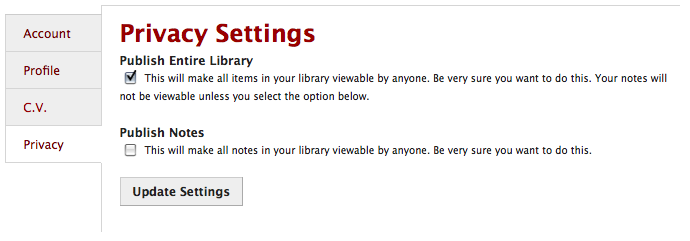
To use the Yahoo! Pipe, you will need two bits of information: the Zotero username and the Zotero user number. These bits of information are available in the URL of a library on the Zotero website. For instance, the URL to my Zotero page is::
The dltj is my Zotero Username and 683 is my Zotero User Number. Similarly, for Dan Cohen's Zotero page, his Username is dancohen and his User Number is 2. With that information you can go to the Zotero-to-RSS Yahoo! Pipe (http://pipes.yahoo.com/peteratohiolink/zoterolibraryrss), and plug it into the form (see figure 2). Select the "Run Pipe" button and after a few seconds you'll see the results.

If you see an error "error fetching" warning with a "403 Forbidden" message, that means the user has not opened up their Zotero library for public viewing. But if they (or you!) have, then you can use the "Get as RSS" link as a way to track additions to the library. For instance, I've added my Zotero library feed as a "Blog" source to my FriendFeed profile.